
1. Install inactive
The package loads with Climate Control Active turned off, so the fan, humidifier and optional heater are not controlled during initial setup.
SmartGrowLab is a ready-to-install YAML package for one grow space. Map your existing temperature and humidity sensors and smart switches, then control the exhaust fan, humidifier, optional heater and grow-light schedule from a four-view Home Assistant dashboard.
Install with climate control off, verify the readings and intended actions, then activate the system when you are ready.
€39 one-time · One grow space · One Home Assistant instance
No HACS · No cloud account required by SmartGrowLab
Plants from my own grow box, Home Assistant dashboard walkthrough and controlled automation demo using test sensors.
Subscribe to @SmartGrowLab ↗ — time-lapses, dashboard previews (Setup, Grow, Settings, Diagnostics), and setup walkthroughs.
SmartGrowLab installs with climate control off. Map your entities, verify the readings and intended actions, and activate the system only when the behavior looks right.
The package loads with Climate Control Active turned off, so the fan, humidifier and optional heater are not controlled during initial setup.
Confirm that your sensors and switches are mapped correctly, available in Home Assistant and reporting valid states.
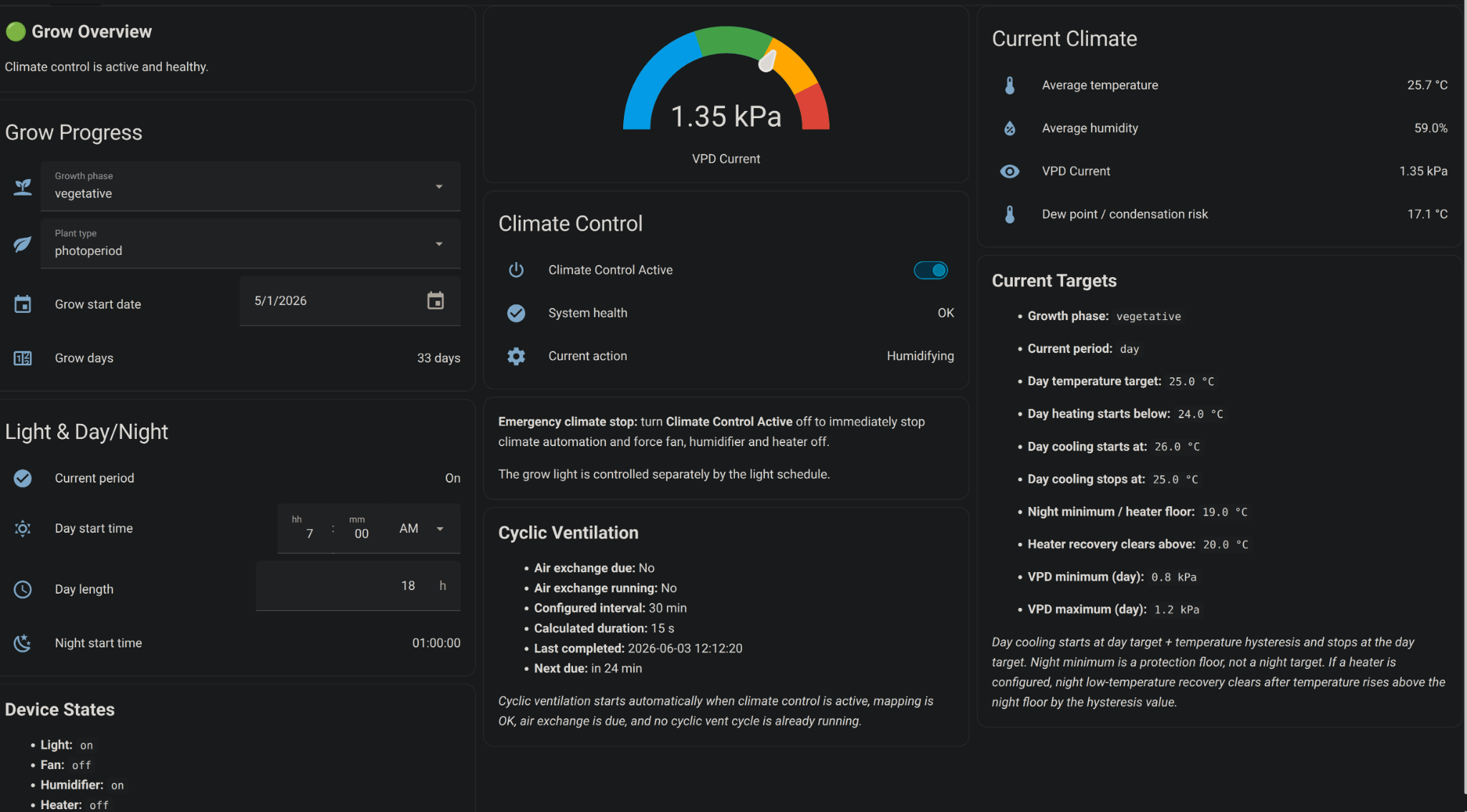
Review temperature, humidity, VPD, Current Targets, System health and Current action without immediately handing over climate control.
Disable any competing climate automations, activate SmartGrowLab with one toggle, or switch climate control off again if you need to stop the actuators and review the setup.
Calculating VPD is the easy part. Reliable automation also needs clear priorities, device timing, failure handling, phase logic and diagnostics.
Use separate VPD and temperature targets for each growth phase and day or night period. Hysteresis and minimum device ON/OFF times help reduce unnecessary actuator switching.
Every 15 seconds, Climate Brain resolves safety, VPD and temperature priorities in a defined order, so the package does not issue conflicting commands to the same devices.
If no valid temperature or humidity reading remains, SmartGrowLab changes System health to ERROR, switches the humidifier and configured heater off, and falls back to safety ventilation.
See System health, Current action, device availability, active targets, alert flags and runtime information directly in Home Assistant.
SmartGrowLab can automatically transition from seedling to vegetative for both plant types and from vegetative to flowering for autoflowers. Targets adapt to the active phase and day or night period.
Enter the grow-space dimensions and rated fan airflow to calculate a scheduled cyclic ventilation runtime. Normal fan operation can also satisfy the scheduled air exchange without starting a redundant cycle.
SmartGrowLab is compatible when Home Assistant exposes your climate readings as sensor.* entities and the controlled devices as switch.* entities. Compatibility depends primarily on the Home Assistant entity domain and availability, not the hardware brand.
sensor.* entitysensor.* entityswitch.*switch.*switch.*switch.*light.* entity cannot be mapped directlyIf your grow light is exposed as light.*, expose it as switch.* through Home Assistant or use a compatible smart plug. Read the full compatible hardware guide →
I’m Daniel – a Linux admin and home grower. SmartGrowLab started as my own Home Assistant setup for controlling climate inside my grow tent. The result is a documented, ready-to-use package for growers who want local VPD control without building everything from scratch.
Small, focused, and built for people who understand sensors, switches and local-first automation.
Copy the SmartGrowLab package files into Home Assistant.
Add the package and dashboard include lines to configuration.yaml.
Map your sensors and switches from the SmartGrowLab dashboard.
Uses your existing Home Assistant sensor.* and switch.* entities.
No custom integration. No proprietary controller. No recurring subscription for this purchase.
A ready-to-install Home Assistant package for one grow space and one Home Assistant instance. No recurring subscription for this purchase.
A ready-to-install Home Assistant package for one grow space and one Home Assistant instance.
IncludedYou are purchasing the current v1.0 package. Maintenance fixes, documentation updates and compatibility improvements may be released on a best-effort basis; future modules and major versions are not included unless explicitly stated.
Not includedDigital Home Assistant package · One HA instance · Delivered through Gumroad
SmartGrowLab is designed for one grow space already connected to Home Assistant. Building your own automation and using a dedicated controller are also valid options, depending on how much control, setup work and vendor integration you prefer.
Explore free resources to understand VPD, ventilation and hardware compatibility before you automate the tent.
Calculate vapor pressure deficit for seedling, veg and flower.
Open →Estimate fan runtime from tent size and airflow.
Open →Sensors, smart plugs and local-first setup.
Read →Deep dive into VPD and Home Assistant automation.
Read →Build a dual-sensor ESPHome node for Home Assistant.
Read →No. SmartGrowLab Climate Brain is a digital product — a Home Assistant Package (YAML configuration) that runs on your existing HA instance. You use your own sensors and smart plugs.
The purchase includes the current SmartGrowLab Climate Brain v1.0 package, four-view dashboard, user guide and a license for one Home Assistant instance. It is a one-time payment. No recurring subscription for this purchase.
You are purchasing the version described on this page. Maintenance fixes, documentation updates and Home Assistant compatibility improvements may be released on a best-effort basis. Future modules, major versions, custom integrations and individual installation work are not included unless explicitly stated.
Yes, if you choose to use cyclic ventilation. You can enter your grow box dimensions and fan airflow; the system calculates a recommended runtime to exchange the full air volume, with a phase multiplier. This is optional — Climate Brain works perfectly on VPD triggers alone if you don't need timed air cycles.
You set the grow start date and pick the plant type. For photoperiod plants, Climate Brain only auto-transitions seedling → vegetative; you keep manual control over the switch to flowering (which is driven by your light schedule, not days). For autoflowers, Climate Brain handles both seedling → vegetative and vegetative → flowering automatically. You can turn auto phase change off entirely at any time.
If no valid temperature reading or no valid humidity reading remains, SmartGrowLab changes System health to ERROR, switches the humidifier and configured heater off, and falls back to safety ventilation.
It sends one alert, one reminder after one hour if the condition remains active, and a recovery notification when valid readings return.
When two sensors are configured for the same measurement, losing one can result in a WARNING while the remaining valid sensor keeps the system operating.
Climate Brain itself runs locally on Home Assistant. Cloud-based devices such as Tuya or Sonoff Cloud may work, but local-first devices such as Shelly, Tasmota, ESPHome or Zigbee are strongly recommended for unattended grows because they continue working without internet.
Yes. Map your sensor to Sensor 1 and leave Sensor 2 empty. Climate Brain will use that single reading for all decisions.
Yes, if Home Assistant exposes your climate readings as sensor.* entities and your controlled devices as switch.* entities. Climate Brain is brand-agnostic, but local and reliable devices are recommended for unattended grows. See the full mapping table in the Hardware Guide
ESP32 + SHT40 Sensor Guide.
Yes, but use the documented passive rollout procedure. Install SmartGrowLab with Climate Control Active off, map your entities, verify the readings and Current action, and only then disable your existing climate automations and activate SmartGrowLab.
Never run two climate-control systems against the same actuators.
Home Assistant preserves the System Active state. If Climate Brain was running before the restart, it resumes immediately when HA comes back up — there is no global wait for sensors. All safety layers (heater watchdog, critical override, cyclic vent guardian, mapping validation) are active from the first decision cycle. If you prefer a cold start, toggle System Active off before the restart.
No. The heater is optional and the entire heating logic is gated on whether you map a heater switch. Climate Brain works without one — the dashboard shows "not configured" for the heater throughout the UI.
Best-effort email support is available to verified customers for SmartGrowLab bugs, documented mapping issues and dashboard problems.
General Home Assistant troubleshooting, custom integrations, hardware problems and electrical installation are outside the support scope.
Watering automation, PPFD/DLI light measurement, camera or live video, timelapse generation, HACS components, sensor drift detection, and runtime watchdogs for fan or humidifier. These are deliberately scoped out and may be released or added later.
Map your existing Home Assistant sensors and switches, verify the readings and intended actions with climate control off, then activate local VPD-based control when your setup is ready.